Automate Code Reviews and DevOps Tasks with Claude Code Slash Command Loops
A practical, copy-paste workflow for using Claude Code's slash commands to run scheduled automation for PR reviews, issue triage, and deployment monitoring, reducing manual engineering overhead.
Practical Summary
This workflow teaches you how to set up automated, scheduled loops for common development tasks using Claude Code's slash commands. By configuring seven specific loops, you can automate time-consuming activities like pull request reviews, mining Slack feedback into PRs, closing stale issues, and watching for deployment regressions, allowing engineers to focus on higher-value work.
Why It Matters
For engineering teams, automating routine code review and DevOps tasks directly reduces labor costs and accelerates development cycles. This workflow provides a concrete, reusable blueprint for implementing AI-assisted automation that minimizes manual intervention, helping to optimize the cost and efficiency of software development workflows.
Understanding the Claude Code Loop Automation
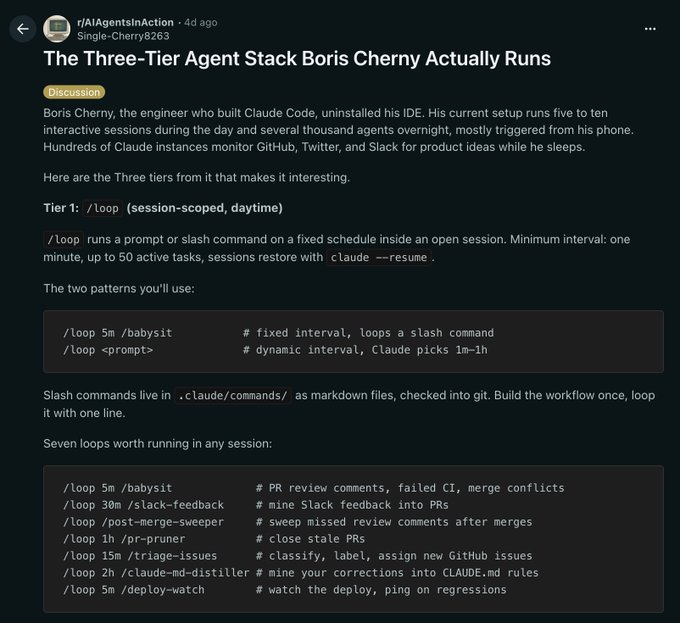
The core concept is using Claude Code's `/loop` slash command to run other slash commands on a fixed schedule within an open session. This creates automated agents that handle repetitive tasks. The example workflow defines seven key loops for common engineering chores.
Step 1: Prepare Your Slash Commands
First, create the slash command files you want to automate. These are Markdown files (e.g., `babysit.md` for the `/babysit` command) that contain your AI prompts. Store them in the `.claude/commands` directory within your git repository.
Step 2: Define and Run Your Automation Loops
Once your commands are in place, you can start a loop for each task directly from your terminal. The general syntax is `/loop [interval] /[command-name]`. For example, to run the PR review and failure check command every 5 minutes, you would execute: `/loop 5m /babysit`. Do this for each of the seven tasks listed to create a full automation suite.