Build a Personal AI Coding Harness to Reduce Model Cost and Dependency
A practitioner's step-by-step workflow for assembling a Pi-based coding system that uses multiple models to cut costs and avoid single-vendor lock-in.
Practical Summary
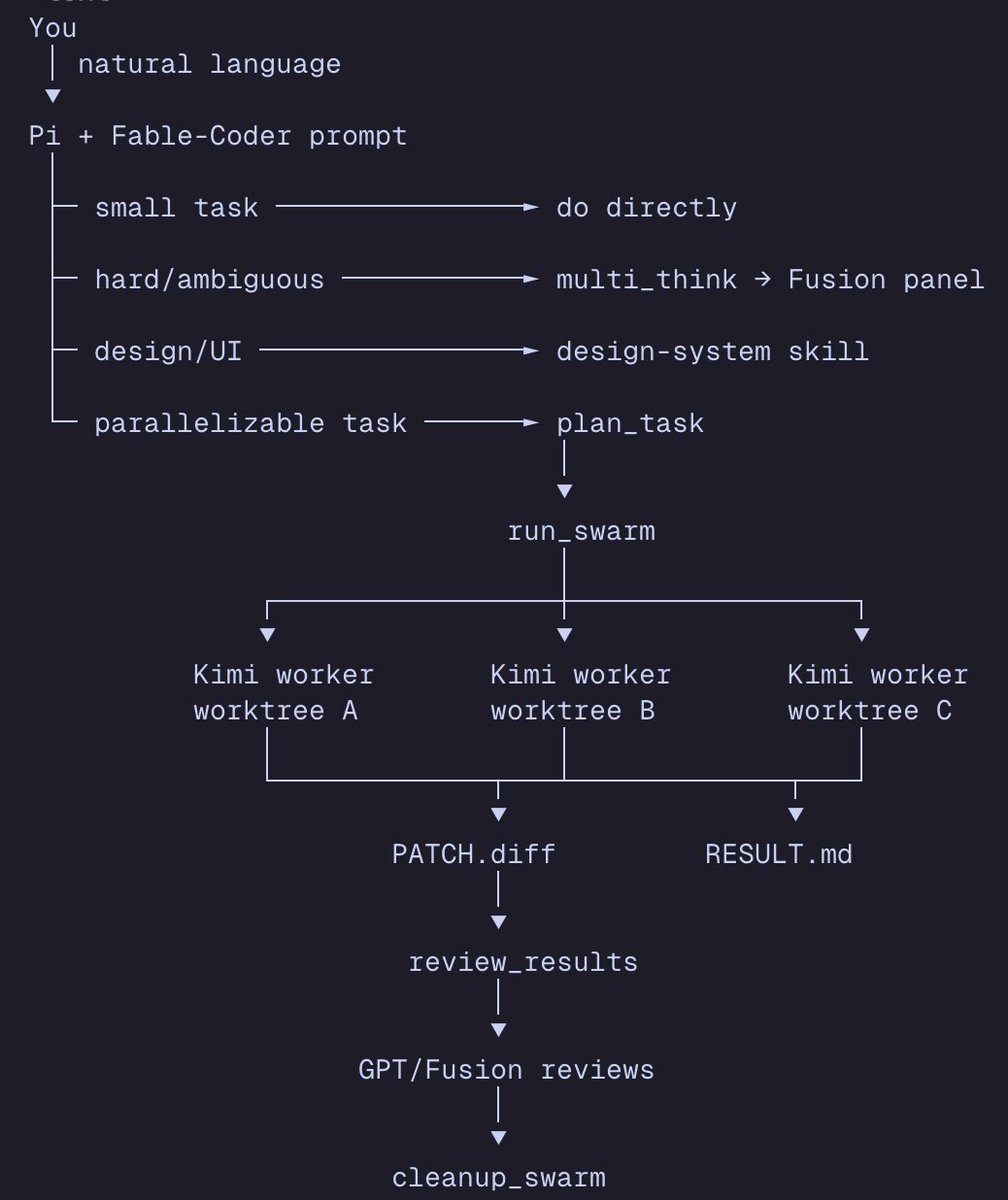
This guide outlines how to construct a personalized AI coding harness using open-source tools like Pi, integrating models like Codex 5.5, FUSION, and Kimi k2.7 for different tasks. The goal is to achieve high performance while reducing reliance on a single expensive model and optimizing workflow efficiency.
Why It Matters
For developers and engineering teams, this approach directly addresses cost reduction and workflow optimization. It provides a reproducible method to leverage multiple AI models strategically, potentially lowering API expenses while maintaining or improving performance on coding tasks like planning, execution, and code review.
Step 1: Set Up Your Base Harness
Begin by installing Pi, an open-source coding harness. Its key advantage is that you can customize it and connect to various AI models from different providers, forming the foundation of your personal system.
Step 2: Configure Your Default Model
Within your Pi harness, set Codex 5.5 as your default primary model. This serves as the main engine for your coding tasks.
Step 3: Analyze System Prompts
Study publicly available system prompts from advanced AI tools. The author suggests this helps in understanding how to frame instructions effectively for your harness. Analyze how these prompts structure tasks and provide context.
Step 4: Provide Specialized Context
Feed your Codex model specific context from engineering repositories like 'Loop Engineering'. This trains it on the patterns and practices relevant to your work, especially if existing repos are inefficient or bloated. The goal is to improve the efficiency of the AI's output for your specific needs.
Step 5: Delegate Tasks to Specialized Models
Integrate other models for specific sub-tasks to optimize cost and performance. Use FUSION via Openrouter for complex planning, logic, and review tasks. Use Kimi k2.7 code for sub-agents and execution of discrete coding steps. This creates a multi-model workflow.
Step 6: Test and Refine the System
Iterate on the harness by having it work on your own codebase ('dog fooding'). Refine the prompts, context, and model assignments until the system performs reliably. Once dialed in, apply it to a repository for a deep analysis to validate its effectiveness.